
Widget for GitHub (Unofficial)1.3.3 - Google Play
Sie können die Ergebnisse sehen in wenige Sekunden.
Beschreibung des Herausgebers



Beitrags-Widget für GitHub (inoffiziell)
Dies ist eine inoffizielle Drittanbieter-Anwendung und steht in keiner Verbindung zu GitHub, Inc., wird nicht von GitHub, Inc. unterstützt oder gesponsert.
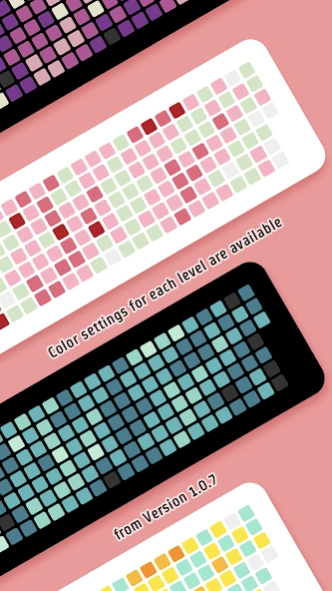
Beitragsdiagramm-Widget für GitHub.
* Beitragsfarbe ändern
* Hintergrundfarbe (Weiß oder Schwarz) und Deckkraft ändern
* Größe des Widgets anpassbar
-- Manuelle Aktualisierung -- Tippen Sie auf das Widget, um die Daten neu zu laden.
-- Automatische Aktualisierung -- Die Daten werden zweimal täglich automatisch geladen. Öffnen Sie die App und aktivieren Sie die automatische Aktualisierung in den Einstellungen.
Über Widget for GitHub (Unofficial)
Das Unternehmen, das Widget for GitHub (Unofficial) entwickelt, ist chlorocube. Die neueste vom Entwickler veröffentlichte Version ist 1.3.3.
Um Widget for GitHub (Unofficial) auf Ihrem Android-Gerät zu installieren, klicken Sie einfach oben auf die grüne Schaltfläche Weiter zur App, um den Installationsvorgang zu starten. Die App ist seit 2026-10-25 auf unserer Website gelistet und wurde 0 Mal heruntergeladen. Wir haben bereits überprüft, ob der Download-Link sicher ist; zu Ihrem eigenen Schutz empfehlen wir jedoch, die heruntergeladene App mit Ihrem Antivirenprogramm zu scannen. Ihr Antivirenprogramm erkennt Widget for GitHub (Unofficial) möglicherweise als Malware, falls der Download-Link zu jp.co.chlorocube.githubcontributions defekt ist.
So installieren Sie Widget for GitHub (Unofficial) auf Ihrem Android-Gerät:
- Klicken Sie auf unserer Website auf die Schaltfläche Weiter zur App. Dadurch werden Sie zu Google Play weitergeleitet.
- Sobald Widget for GitHub (Unofficial) im Google Play-Eintrag Ihres Android-Geräts angezeigt wird, können Sie mit dem Download und der Installation beginnen. Tippen Sie auf die Schaltfläche Installieren unterhalb der Suchleiste und rechts neben dem App-Symbol.
- Es wird ein Popup-Fenster mit den Berechtigungen angezeigt, die Widget for GitHub (Unofficial) benötigt. Klicken Sie auf Akzeptieren, um fortzufahren.
- Widget for GitHub (Unofficial) wird auf Ihr Gerät heruntergeladen, wobei ein Fortschrittsbalken angezeigt wird. Sobald der Download abgeschlossen ist, beginnt die Installation und Sie erhalten eine Benachrichtigung, nachdem die Installation beendet ist.
Programmdetails
Systemanforderungen
Download-Informationen
Preise
Versionsverlauf
Version 1.3.3
veröffentlicht am 2026-10-25
v1.3.3- Updated app namev1.3.2- UI polishv1.3.1- Minor bug fixes and UI polishv1.3.0- Improved automatic update functionalityv1.2.0- Fixed minor bugs- Added dark mode support for the appv1.1.4- Added turn off battery optimization button If auto update stops, please turn off battery optimization.
Version 1.3.2
veröffentlicht am 2026-08-25
v1.3.2
- UI polish
v1.3.1
- Minor bug fixes and UI polish
v1.3.0
- Improved automatic update functionality
v1.2.0
- Fixed minor bugs
- Added dark mode support for the app
v1.1.4
- Added turn off battery optimization button
If auto update stops, please turn off battery optimization.
Version 1.3.0
veröffentlicht am 2025-11-23
v1.3.0
- Improved automatic update function
v1.2.0
- Fixed minor bugs
- Supported dark mode for the app
v1.1.4
- Added turn off battery optimization button
If auto update stops, please turn off battery optimization.
v1.1.3
- Added retry logic when data acquisition fails
- Fixed minor bugs
v1.1.2
- Library update
v1.1.1
- Changed automatic update function to twice a day
- Fixed a problem about color code editing
Version 1.2.0
veröffentlicht am 2025-09-13
v1.2.0
- Fixed minor bugs
- Supported dark mode for the app
v1.1.4
- Added turn off battery optimization button
If auto update stops, please turn off battery optimization.
v1.1.3
- Added retry logic when data acquisition fails
- Fixed minor bugs
v1.1.2
- Library update
v1.1.1
- Changed automatic update function to twice a day
- Fixed a problem about color code editing
Version 1.1.3
veröffentlicht am 2024-09-07
v1.1.3
- Added retry logic when data acquisition fails
- Fixed minor bugs
v1.1.2
- Library update
v1.1.1
- Changed automatic update function to twice a day
- Fixed a problem about color code editing
v1.1.0
- Added automatic update function (default is OFF)
- Added the feature to change contributions color by editing the color code
- Added the feature to initialize contributions color
v1.0.11
- Library update
v1.0.10
- GDPR compliant
v1.0.9
- Fixed a problem with incorrect data display position
Version 1.1.2
veröffentlicht am 2024-06-21
v1.1.2
- Library update
v1.1.1
- Changed automatic update function to twice a day
- Fixed a problem about color code editing
v1.1.0
- Added automatic update function (default is OFF)
- Added the feature to change contributions color by editing the color code
- Added the feature to initialize contributions color
v1.0.11
- Library update
v1.0.10
- GDPR compliant
v1.0.9
- Fixed a problem with incorrect data display position
Haftungsausschluss
Offizieller Google Play-Link
Wir hosten die App Widget for GitHub (Unofficial) nicht auf unseren Servern. Wir haben sie nicht auf Viren, Adware, Spyware oder andere Arten von Malware überprüft. Diese App wird von Google gehostet und hat deren Nutzungsbedingungen erfüllt, um dort gelistet zu werden. Wir empfehlen Vorsicht bei der Installation.
Der Google Play-Link für Widget for GitHub (Unofficial) wird Ihnen von apps112.com ohne jegliche Gewährleistungen, Zusicherungen oder Garantien zur Verfügung gestellt; der Zugriff erfolgt daher auf Ihr eigenes Risiko.
Wenn Sie Fragen zu dieser speziellen App haben, wenden Sie sich bitte direkt an den App-Entwickler. Bei Fragen zu den Funktionen der Website apps112.com kontaktieren Sie uns bitte.
